bikespeed-RS for Bosch Smart System

E-Bike-Tuning for Bosch Smart System
 With our bikespeed-RS, motor assistance on your Bosch E-Bike remains available even above 25 km/h.
Thanks to the optional bikespeed display, the actual riding speed remains visible at all times. Other important ride data remains visible and readily accessible.
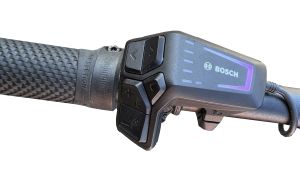
The system is installed discreetly within the bike and can be activated or deactivated conveniently using the existing controls.
It automatically detects the motor, display, and system parameters. No additional configuration or manual setup is required.
⇒ Find the Right bikespeed-RS for my E-Bike
The Advantages of bikespeed-RS for Bosch Smart System
The Bosch Smart System places specific demands on modern tuning solutions. The bikespeed-RS has been developed specifically for this generation of Bosch drive systems.
RealSpeed Display
The actual riding speed is shown on the optional bikespeed auxiliary display. This also includes mileage, trip distance, average speed, maximum speed, and other important ride data.
Automatic Detection
The motor, display, and system parameters are detected automatically. No additional configuration is required.
Plug-and-Play Installation
Connection is made using model-specific wiring harnesses. Original cables do not need to be cut, modified, or altered in any way.
Easy Operation
The tuning system can be activated or deactivated using the existing controls on your E-Bike. No additional switches or smartphone apps are required.
Continuous Development
bikespeed has supported Bosch drive systems for many years. New software versions are regularly tested and added to our compatibility list.
bikespeed Display for Bosch Smart System
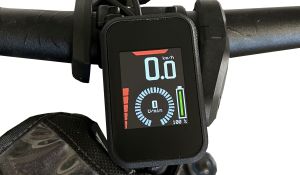 Our display was developed specifically for the Bosch Smart System, making tuning with a true RealSpeed display possible.
The Bosch Smart System processes ride data differently from previous Bosch generations. Based on our current technical understanding, it is therefore not possible to display accurate ride data on an original Bosch display or within the Bosch Flow app.
For this reason, we developed an optional display specifically for the Bosch Smart System. It shows the actual riding speed as well as additional ride information directly while riding.
The display clips onto a Kiox 300 or Kiox 500 display mount. If your bike is not already equipped with the required mount, it can easily be retrofitted.
Which Magnet Type Does My Bosch Smart System Have?
Bikes with the Bosch Smart System use different types of speed detection. To select the correct bikespeed-RS, it is therefore important to know which magnet type is installed on your bike.
In general, the following variants are used:
Spoke Magnet
The classic spoke magnet is visibly mounted on a spoke of the rear wheel. The sensor is usually located on the chainstay or near the dropout.
Brake Disc Magnet
With this variant, the magnet is located in the area of the rear brake disc or integrated into the brake disc magnet. In most cases, it is still clearly visible from the outside.
Rim Magnet
With a rim magnet, the magnet is located near the valve on the rim. Depending on the bike model, it may be visibly mounted on the rim or concealed between the rim and the tube or tire.Especially with concealed rim magnets, the magnet is not always immediately visible. A small piece of iron or another magnetic object can help locate it. Carefully move it along the rim or rear wheel. The metal will be attracted at the point where the magnet is located.
ABS
On bikes equipped with ABS, speed is measured via the ABS system. We currently do not offer a bikespeed-RS for this variant.
Why Is This Important?
The magnet type determines which bikespeed-RS version is suitable for your bike.
Our product finder therefore asks for the installed magnet type and guides you step by step to the correct solution.
⇒ Find the right bikespeed-RS for my E-Bike
Compatibility
The overview below lists the currently supported drive units, displays, batteries, and software versions of the Bosch Smart System:
| Model Year | bikespeed-RS delivery date | Drive Unit | Display | Battery | Bike Software Date |
|---|
Last updated: unknown
If you plan to update your E-Bike, please check this compatibility list in advance and compare it with the purchase date of your bikespeed-RS to ensure that compatibility will be maintained after the update. In addition, please carefully review the update-related information provided in your bikespeed-RS installation manual.
If the software version of your E-Bike is not listed in the compatibility overview above, or if the purchase date of your bikespeed-RS is no longer listed as compatible with the planned update, please contact us by email at info@bikespeed.de or via our contact form. We will review your request and get back to you promptly with a suitable solution.
Find the Right bikespeed-RS
Not sure which bikespeed-RS is compatible with your Bosch Smart System?
Our product finder guides you step by step to the correct version. Simply select the manufacturer, drive unit, and display. You will then automatically be shown the appropriate solution for your bike.
⇒ Go to the Product Finder
Alternatively, we are happy to assist you personally with any questions regarding your drive unit, display, or software version. Just get in touch with us:
⇒ Contact Us